Introduction to
functional reactive programming
with Cycle.js
Jan van Brügge
Why streams?
Transforming data - synchronous
                    [1, 2, 3, 4, 5]
                        .map(x => x * 2)
                        .forEach(x => console.log(x));
Transforming data - asynchronous
                    Promise.resolve([1, 2, 3, 4, 5]) //Or from API
                        .then(arr => arr
                            .map(x => x * 2)
                            .forEach(x => console.log(x))
                        );
Transforming data - streaming
                    Observable.from([1, 2, 3, 4, 5]) //Or from a websocket
                        .map(x => x * 2)
                        .subscribe(x => console.log(x));
The catch
Array \(\subset\) Promise \(\subset\) StreamWhat problems are easier to solve with streams
Make an initial request to the server and write the data to the DOM. Update the data with a websocket.
                    const ws$ = websocket$.map(message => message.payload);
                    const http$ = response$.map(res => res.body)
                        .map(xs.fromArray)
                        .flatten();

                    xs.merge(ws$, http$)
                        .fold((data, x) => data.concat(x), [])
                        .compose(debounce(50)) //Batch DOM updates
                        .subscribe({ next: updateDOM });
What problems are easier to solve with streams
If the user clicks x times within y milliseconds print the class of the element that was clicked.
                    click$
                    .compose(throttle(y))
                    .map(event => {
                        const numClick$ = click$.endWhen(xs.periodic(y).take(1))
                            .fold(n => n + 1, 1)
                            .last();

                        return numClick$
                            .filter(n => n >= x)
                            .mapTo(event.target.className);
                    }).flatten()
                    .addListener({ next: console.log });
Runnable example on webpackbin
Cycle.js
Cycle is like the physicist’s dream of a unified theory of everything, but for JavaScript.
Nick Johnstone
A Cycle.js app is just a function taking sources as input and returning sinks as result.
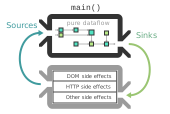
Cycle.js - short summary
- Common interface are streams
- Cycle app = function from sources to sinks
- Expandable with own side effects
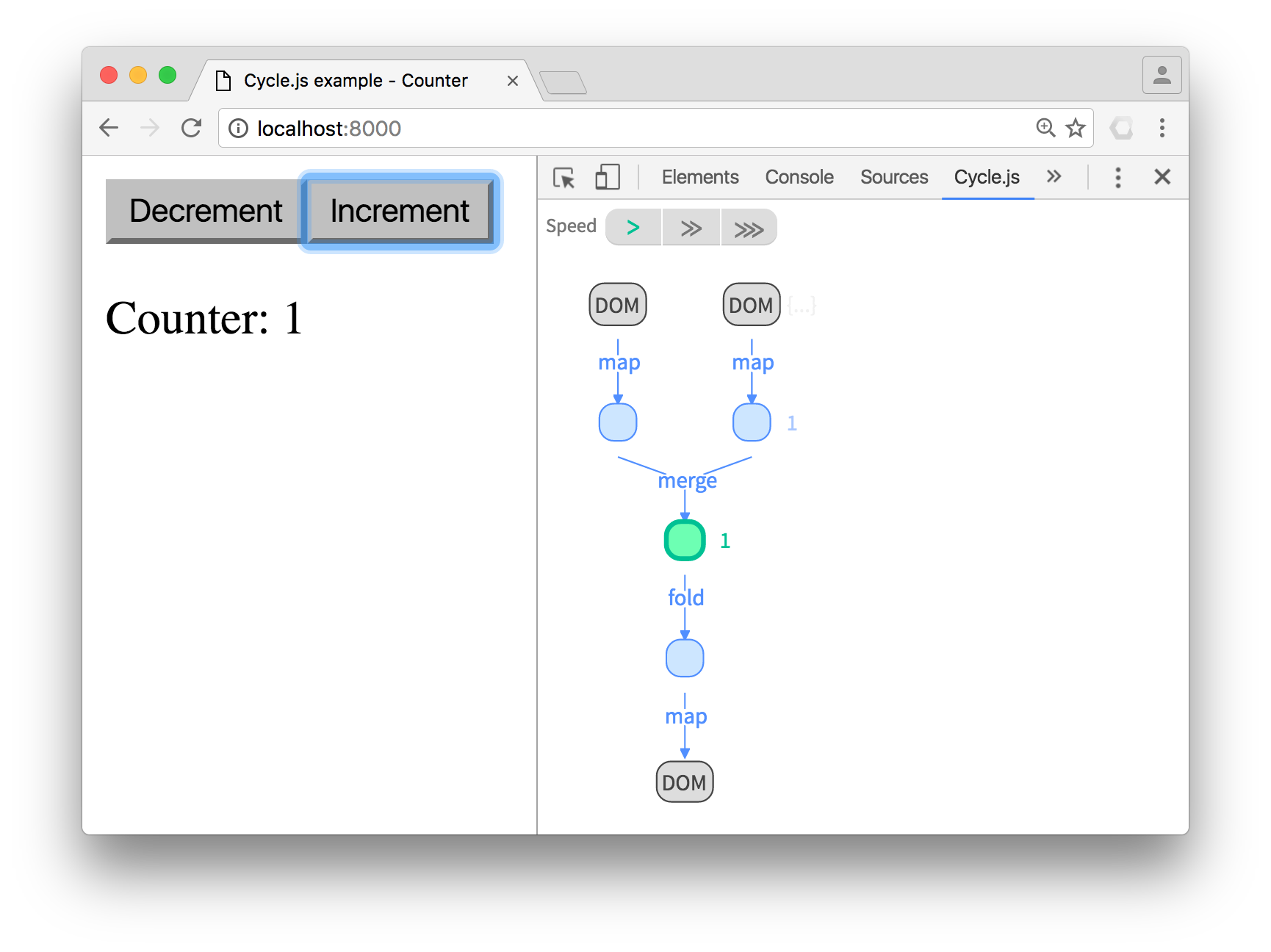
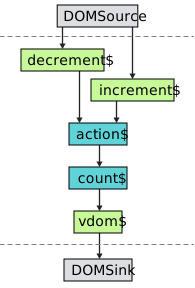
A simple counter app example
                    import xs from 'xstream';
                    import { div, button, p } from '@cycle/dom';

                    function Counter(sources) {
                      const decrement$ = sources.DOM
                        .select('.decrement').events('click').mapTo(-1);

                      const increment$ = sources.DOM
                        .select('.increment').events('click').mapTo(+1);

                      const action$ = xs.merge(decrement$, increment$);
                      const count$ = action$.fold((x, y) => x + y, 0);

                      const vdom$ = count$.map(count =>
                        div([
                          button('.decrement', 'Decrement'),
                          button('.increment', 'Increment'),
                          p('Counter: ' + count)
                        ])
                      );
                      return {
                        DOM: vdom$
                      };
                    }
Implications of cycle app = function
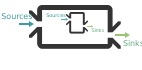
- Nestable
- Wrappable
Nestable
                    import Greeter from './greeter';
                    import Counter from './counter';

                    function main(sources) {
                      const greeterSinks = Greeter(sources);
                      const counterSinks = Counter(sources);

                      const vdom$ = xs.combine(greeterSinks.DOM, counterSinks.DOM)
                        .map(children =>

                                Some children
                                { children }

                        );

                      return {
                        DOM: vdom$
                      };
                    }
Wrappable - isolation
                    import Counter from './counter';

                    function main(sources) {
                      const counter1 = Counter(sources);
                      const counter2 = Counter(sources);

                      const vdom$ = xs.combine(counter1.DOM, counter2.DOM)
                        .map(children =>

                                Some children
                                { children }

                        );

                      return {
                        DOM: vdom$
                      };
                    }
Problem
Both counters are activated if you press any button
Solution
Isolate them!
Wrappable - isolation
                    import Counter from './counter';

                    function main(sources) {
                    - const counter1 = Counter(sources);
                    - const counter2 = Counter(sources);
                    + const counter1 = isolate(Counter, 'counterA')(sources);
                    + const counter2 = isolate(Counter, 'counterB')(sources);


                      const vdom$ = xs.combine(counter1.DOM, counter2.DOM)
                        .map(children =>

                                Some children
                                { children }

                        );

                      return {
                        DOM: vdom$
                      };
                    }
Wrappable - helpers
import Counter from './counter';
function main(sources) {
const vdom$ = xs.of();
const modal$ = sources.DOM.select('.btn').events('click')
.mapTo({
type: 'open',
component: Counter
});
return {
DOM: vdom$,
modal: modal$
};
}
const wrappedMain = modalify(main);
Drivers
Writing your own drivers -
write-only
                    function logDriver(sink$) {
                        sink$.addListener({
                            next: console.log
                        });
                        //We do not return anything --> write-only driver
                    }

                    run(main, {
                        log: logDriver
                    });
Writing your own drivers -
read-only
                    function websocketDriver(/* no argument --> read-only */) {
                        let websocket = undefined;
                        return xs.create({
                            start: listener => {
                                websocket = new Websocket(myEndpoint);
                                websocket.onmessage = listener.next;
                            },
                            stop: () => {
                                websocket.close();
                            }
                        });
                    }

                    run(main, {
                        ws: websocketDriver
                    });
State management
Redux-like
                    function reduxify(main, initialState, rootReducer) {
                        return function(sources) {
                            const actionProxy$ = xs.create();

                            const state$ = actionProxy$
                                .fold(rootReducer, initialState);

                            const sinks = main({ ...sources, state: state$ });

                            actionProxy$.imitate(sinks.state);
                            delete sinks.state;

                            return sinks;
                        }
                    }
Onionify
A fractal state management tool for Cycle.js applications.
                    import xs from 'xstream';

                    function Counter(sources) {
                      const decrement$ = sources.DOM
                        .select('.decrement').events('click')
                        .mapTo(state => state - 1);

                      const increment$ = sources.DOM
                        .select('.increment').events('click')
                        .mapTo(state => state + 1);

                      const reducer$ = xs.merge(decrement$, increment$);

                      const vdom$ = sources.onion.state$.map(count =>
                        div([
                          button('.decrement', 'Decrement'),
                          button('.increment', 'Increment'),
                          p('Counter: ' + count)
                        ])
                      );
                      return {
                        DOM: vdom$,
                        onion: reducer$
                      };
                    }
Fractal state
                    import Counter from './counter';

                    function main(sources) {
                      const counter1 = isolate(Counter, 'counterA')(sources);
                      const counter2 = isolate(Counter, 'counterB')(sources);


                      const vdom$ = xs.combine(counter1.DOM, counter2.DOM)
                        .map(children =>

                                Some children
                                { children }

                        );

                      return {
                        DOM: vdom$,
                        onion: xs.merge(counter1.onion, counter2.onion),
                        log: sources.onion.state$ //what will be printed?
                      };
                    }
                    {
                        counterA: 5,
                        counterB: 3
                    }
Lenses
Compare the parent state to the child state
                    {
                        counterA: 5,
                        counterB: 3
                    }

                    //childA
                    5

                    //childB
                    3
Lenses
We can model this behavior
                    -- on the source (state$)
                    isolateSource :: ParentState -> ChildState

                    -- on the sink (reducer$)
                    isolateSinks :: (ParentState, ChildState) -> ParentState
Lenses
We can model this behavior
                    -- on the source (state$)
                    get :: ParentState -> ChildState

                    -- on the sink (reducer$)
                    set :: (ParentState, ChildState) -> ParentState
Lenses
We can model this behavior
                    const lens = {
                        get,
                        set
                    };
Lenses
                    const halfLens = {
                        get: state => state.counterA / 2;
                        set: (state, n) => ({
                            ...state,
                            counterA: n * 2
                        })
                    };

                    function main(sources) {
                      const counter1 = isolate(Counter, 'counterA')(sources);
                      const counter2 = isolate(Counter, {
                          onion: halfLens,
                          '*': 'counterB'
                      })(sources);

                      const vdom$ = xs.combine(counter1.DOM, counter2.DOM)
                        .map(view);

                      return {
                        DOM: vdom$,
                        onion: xs.merge(counter1.onion, counter2.onion),
                      };
                    }
Collections
                    interface TabbarState {
                        active: number;
                        tabs: TabState[];
                    }
                    interface TabState {
                        isActive: boolean; //Automaticly set by the lens
                        name: string;
                    }
                    const selectionLens = {
                        get: state => state.tabs.map(t => ({
                            ...t,
                            isActive: t.id === state.active
                        })),
                        set: (state, tabs) => ({
                            ...state,
                            active: tabs.reduce((acc, curr) => {
                                return curr.isActive && curr.id !== state.active ?
                                    curr.id :
                                    acc;
                                }, state.active),
                            tabs: tabs.map(omit('isActive'))
                        })
                    };
Collections
                    const TabbarComponent = makeCollection({
                        item: TabComponent,
                        itemKey: itemState => itemState.name,
                        itemScope: index => index,
                        collectSinks: instances => ({
                            DOM: instances.pickCombine('DOM').map(children =>
                                { children }
                            ),
                            onion: xs.merge(
                                xs.of(() => initialState),
                                instances.pickMerge('onion')
                            )
                        })
                    });

                    export default const isolatedTabbar = isolate(TabbarComponent, {
                        onion: selectionLens,
                        '*': null
                    });
Quick FAQ
- How do I start? Read the docs and/or watch the egghead.io course
- Are the slides online? Yes, on github: https://jvanbruegge.github.io/munichjs-20.09.2017/
- Do I have to use xstream? No, you can also use RxJS or Most.js
- How big is the community? Currently over 7000 github stars, active support on gitter
- How is the financial support? We are on OpenCollective, being sponsored by Verizon and others